


Widgets

Documents
This is a preview of our new website, which is in active development. Please forgive us if you see incomplete things!
Plan
Deliver
Back Office

Meet your new client app
Give your clients a premium on-the-go
experience with full offline support.
This is a preview of our new website, which is in active development. Please forgive us if you see incomplete things!
Plan
Deliver
Back Office
Meet your new client app
Give your clients a premium on-the-go
experience with full offline support.
Planning
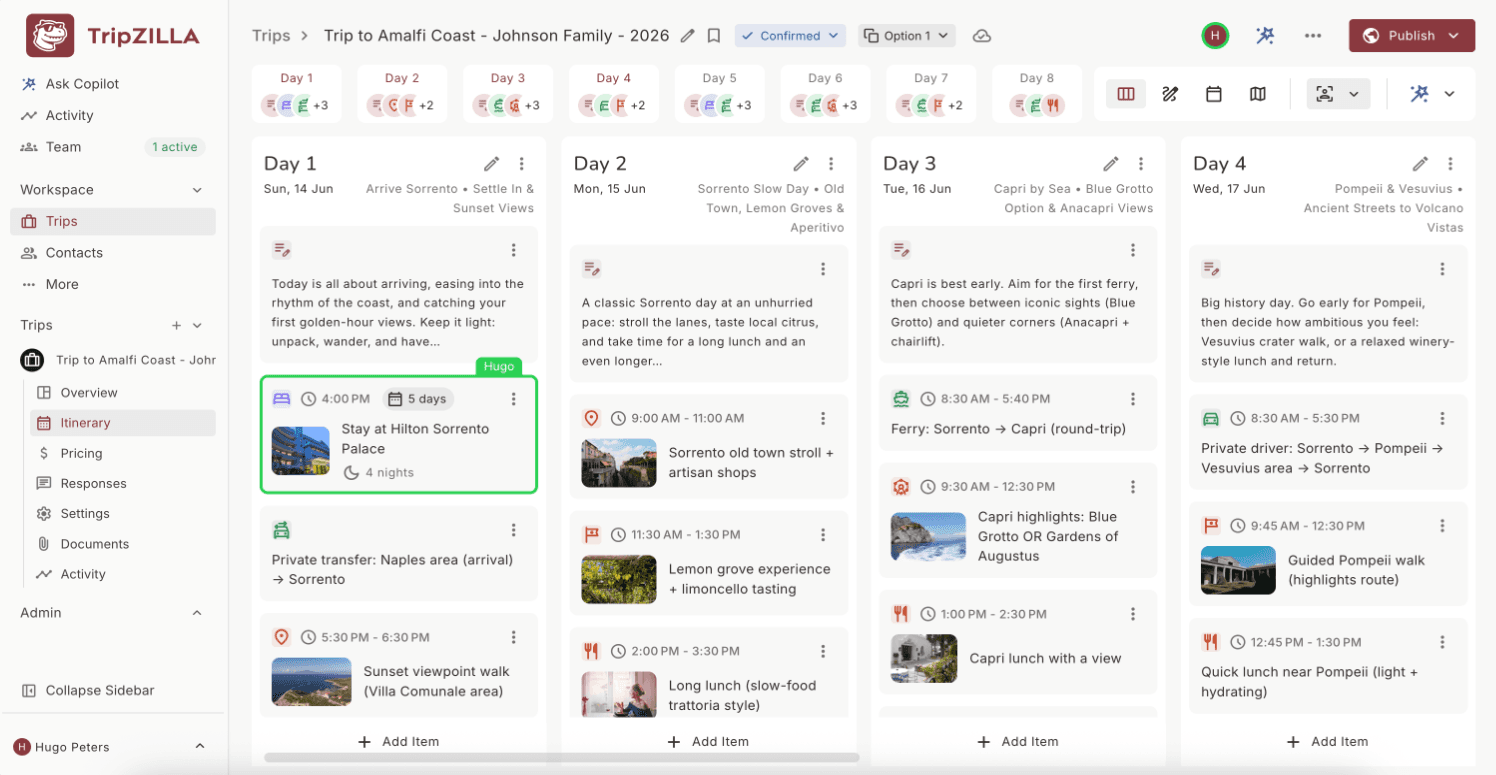
Build visually rich itineraries with drag-and-drop planning, live editing, calendar scheduling, reusable content, and real-time collaboration — all in one workspace.
Build trips dramatically faster
Edit directly inside the itinerary preview
Organize complex travel plans visually
Collaborate with your team in real time
Planning
Build visually rich itineraries with drag-and-drop planning, live editing, calendar scheduling, reusable content, and real-time collaboration — all in one workspace.
Build trips dramatically faster
Edit directly inside the itinerary preview
Organize complex travel plans visually
Collaborate with your team in real time

Save hours every week building proposals with TripZILLA's innovative itinerary builder. Simply click and edit within the itinerary to directly edit content.
Save hours every week building proposals with TripZILLA's innovative itinerary builder. Simply click and edit within the itinerary to directly edit content.
We've built TripZILLA's trip builder from the ground up to handle
complex itineraries with ease, while still being easy to use and
dramatically faster than any trip builder you've used.
We've built TripZILLA's trip builder from the ground up to handle complex itineraries with ease, while still being easy to use and
dramatically faster than any trip builder you've used.
Widgets
Documents
Snippets
Snippets let you turn itinerary items into reusable templates in one click. Drop them into any trip, keep them connected, and update them when the original Snippet changes.
Save notes, intros, activities, packages or complete days as reusable building blocks
Drop saved Snippets into any trip while building
Customize Snippets after adding them to a specific itinerary
Update Snippets when the original has been changed

Snippets
Snippets let you turn itinerary items into reusable templates in one click. Drop them into any trip, keep them connected, and update them when the original Snippet changes.
Save notes, intros, activities, packages or complete days as reusable building blocks
Drop saved Snippets into any trip while building
Customize Snippets after adding them to a specific itinerary
Update Snippets when the original has been changed
Snippets
Snippets let you turn itinerary items into reusable templates in one click. Drop them into any trip, keep them connected, and update them when the original Snippet changes.
Save notes, intros, activities, packages or complete days as reusable building blocks
Drop saved Snippets into any trip while building
Customize Snippets after adding them to a specific itinerary
Update Snippets when the original has been changed
Snippets
Turn itinerary items into Snippets you can use everywhere.
Hotel alternatives within the same itinerary step
Hotel alternatives within the same itinerary step
Hotel alternatives within the same itinerary step

Snippets
Turn itinerary items into Snippets you can use everywhere.
Hotel alternatives within the same itinerary step
Hotel alternatives within the same itinerary step
Hotel alternatives within the same itinerary step
Snippets
Turn itinerary items into Snippets you can use everywhere.
Hotel alternatives within the same itinerary step
Hotel alternatives within the same itinerary step
Hotel alternatives within the same itinerary step
Got a question about choices, trip variations or add-ons? We've got answers!
What are Trip Variations?
Trip Variations allow you to create multiple versions of the same trip — such as budget, premium, luxury, or family-focused experiences — within a single trip. Clients can review and select their preferred variation during the booking flow.
What are Choices?
Choices allow clients to select between alternatives within a trip, such as hotels, activities, flights, room types, or experiences.
What are Add-ons?
Add-ons are optional extras clients can include during booking, such as transfers, excursions, insurance, upgrades, or VIP experiences.
Can clients choose between multiple hotels or activities?
Yes. You can create selectable choices for accommodations, activities, flights, room types, transfers, and more directly within your itinerary.
Do selections automatically update pricing?
Yes. Pricing summaries and totals automatically reflect the options, upgrades, and add-ons selected by the client.
Can different trip variations have different pricing?
Yes. Each trip variation can have its own pricing, included services, accommodations, activities, and optional extras.
Can choices affect the itinerary itself?
Yes. Selected options can automatically update itinerary content, included experiences, pricing, and related trip information.
Can different trip options have different documents?
Yes. Documents can be tied to specific trip variations, selections, or experiences, ensuring clients only see the documents relevant to their confirmed itinerary.
How do clients submit their selections?
Clients review and submit their preferred options through an interactive booking experience in the client portal or mobile app.
Can I offer optional upgrades during booking?
Absolutely. You can offer upgrades and premium experiences directly within the booking flow, including excursions, transfers, room upgrades, and more.
Does this work on mobile devices?
Yes. Clients can review proposals, submit selections, and access their finalized itinerary through the TripZILLA client portal and mobile app.
Do I need to create separate trips for each option?
No. TripZILLA is designed to manage trip variations, selectable choices, and optional add-ons within a single shared trip experience.
Still got questions?
Ask us directly
Got a question about choices, trip variations or add-ons? We've got answers!
What are Trip Variations?
Trip Variations allow you to create multiple versions of the same trip — such as budget, premium, luxury, or family-focused experiences — within a single trip. Clients can review and select their preferred variation during the booking flow.
What are Choices?
Choices allow clients to select between alternatives within a trip, such as hotels, activities, flights, room types, or experiences.
What are Add-ons?
Add-ons are optional extras clients can include during booking, such as transfers, excursions, insurance, upgrades, or VIP experiences.
Can clients choose between multiple hotels or activities?
Yes. You can create selectable choices for accommodations, activities, flights, room types, transfers, and more directly within your itinerary.
Do selections automatically update pricing?
Yes. Pricing summaries and totals automatically reflect the options, upgrades, and add-ons selected by the client.
Can different trip variations have different pricing?
Yes. Each trip variation can have its own pricing, included services, accommodations, activities, and optional extras.
Can choices affect the itinerary itself?
Yes. Selected options can automatically update itinerary content, included experiences, pricing, and related trip information.
Can different trip options have different documents?
Yes. Documents can be tied to specific trip variations, selections, or experiences, ensuring clients only see the documents relevant to their confirmed itinerary.
How do clients submit their selections?
Clients review and submit their preferred options through an interactive booking experience in the client portal or mobile app.
Can I offer optional upgrades during booking?
Absolutely. You can offer upgrades and premium experiences directly within the booking flow, including excursions, transfers, room upgrades, and more.
Does this work on mobile devices?
Yes. Clients can review proposals, submit selections, and access their finalized itinerary through the TripZILLA client portal and mobile app.
Do I need to create separate trips for each option?
No. TripZILLA is designed to manage trip variations, selectable choices, and optional add-ons within a single shared trip experience.
Still got questions?
Ask us directly

Ready to modernize your travel business?
Book a demo and speak to our founders directly.
“
We moved our team in minutes and have not looked back since.
Ulrica Schmid
CEO, ULI&MORE
We'd love to talk to you about how we can help
Switch from outdated travel software
Run your agency on one platform
Impress clients on web and mobile
Save hours every week
Ready to modernize your travel business? Book a demo and speak to our founders directly.
“
We moved our team in minutes and have not looked back since.
Ulrica Schmid
CEO, ULI&MORE
We'd love to talk to you about how we can help
Switch from outdated travel software
Run your agency on one platform
Impress clients on web and mobile
Save hours every week

