This is a preview of our new website, which is in active development. Please forgive us if you see incomplete things!

Planning

Trip Builder
AI Copilot
Hotels & Booking
Group Trips

Browse and present hotels

Browse 3M+ hotels globally, add stays to itineraries in seconds, book directly from TripZILLA, and automatically share vouchers with clients when they’re ready.

3M+ hotels at your fingertips

Rich content like rooms & amenities

RateHawk integration

TripZILLA doesn't take commissions

Planning

Browse and present hotels

Browse 3M+ hotels globally, add stays to itineraries in seconds, book directly from TripZILLA, and automatically share vouchers with clients when they’re ready.

3M+ hotels at your fingertips

Rich content like rooms & amenities

RateHawk integration

TripZILLA doesn't take commissions

Global hotel inventory

Find the right stay faster.

Search over 3M+ hotels globally with live inventory from RateHawk, practical filters, map-based browsing, real rates, room options, and availability — all inside TripZILLA.

Global hotel inventory

Find the right stay faster.

Search over 3M+ hotels globally with live inventory from RateHawk, practical filters, map-based browsing, real rates, room options, and availability — all inside TripZILLA.

Hotel Details

Every hotel, up close

View a complete hotel profile with photos, amenities, descriptions, location, room options, policies, and practical details before proposing or booking a stay.

Review photos, amenities, policies, and location

Compare room options and included services

Keep hotel details connected to the trip

Updated daily, so you always have the latest info

Hotel Details

Every hotel, up close

View a complete hotel profile with photos, amenities, descriptions, location, room options, policies, and practical details before proposing or booking a stay.

Review photos, amenities, policies, and location

Compare room options and included services

Keep hotel details connected to the trip

Updated daily, so you always have the latest info

Build Faster

Add stays to trips in seconds

Add hotels directly to the itinerary without copying names, images, room details or policies between tools.

Add hotels directly to the trip

All details, images and policies automatically included

Keep hotel details connected to the trip

Build Faster

Add stays to trips in seconds

Add hotels directly to the itinerary without copying names, images, room details or policies between tools.

Add hotels directly to the trip

All details, images and policies automatically included

Keep hotel details connected to the trip

Room Assignment

Every traveler knows their room

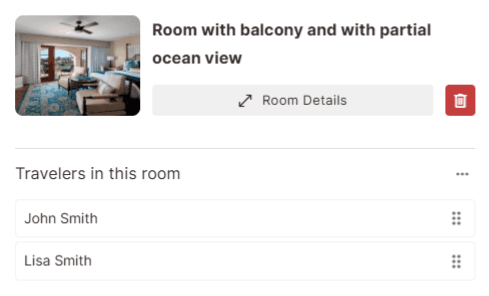
Assign travelers to specific rooms and hotel stays, so families, groups, couples, and multi-room trips stay clear from planning to booking.

Assign travelers to stays and rooms

Manage families, couples, children, and groups clearly

Keep room assignments connected to the booking
Room Assignment

Every traveler knows their room

Assign travelers to specific rooms and hotel stays, so families, groups, couples, and multi-room trips stay clear from planning to booking.

Assign travelers to stays and rooms

Manage families, couples, children, and groups clearly

Keep room assignments connected to the booking

Book Instantly

Book hotels directly in TripZILLA

TripZILLA connects with RateHawk so your team can browse global hotel inventory, review live rates, and book hotels without leaving the trip workflow.

Book hotels instantly

Generate vouchers without leaving the platform

TripZILLA doesn't take commission

Book hotels instantly

Generate vouchers without leaving the platform

TripZILLA doesn't take commission

Integrates with

Book hotels instantly

Generate vouchers without leaving the platform

TripZILLA doesn't take commission

Client Portal

Everything travelers need for their stay

Give clients a clean hotel view with stay dates, room details, amenities, photos, vouchers, and booking information — available from the client portal or mobile app.

Clients can view hotel photos, amenities, and stay details

See assigned rooms and traveler-specific information

Access vouchers and confirmations automatically

Keep hotel documents available on web and mobile

Reduce back-and-forth before departure

Give travelers one place for everything they need

Client Portal

Everything travelers need for their stay

Give clients a clean hotel view with stay dates, room details, amenities, photos, vouchers, and booking information — available from the client portal or mobile app.

Clients can view hotel photos, amenities, and stay details

See assigned rooms and traveler-specific information

Access vouchers and confirmations automatically

Hotel FAQs

Got a question about our hotel system? We've got answers!

Can I search hotels directly inside TripZILLA?

Yes. TripZILLA includes a hotel search experience where your team can browse hotels, view rates, compare rooms, inspect details, and add hotels directly to trips.

Where does the hotel inventory come from?

TripZILLA connects with RateHawk, giving agencies access to 3M+ hotels globally from inside the platform.

Can I book hotels directly from TripZILLA?

Yes. Hotels can be booked directly through the RateHawk integration, so your team does not need to switch between separate supplier portals and itinerary tools.

Can I add hotels to an itinerary?

Yes. Hotels can be added directly into the trip itinerary, including hotel details, images, room information, policies, and rates.

Can I show hotel options to clients?

Yes. You can add hotels as selectable options inside a proposal, allowing clients to compare and choose between different stays. Learn more about interactive proposals

Can travelers be assigned to specific rooms?

Yes. TripZILLA supports traveler-to-room assignment, making it easier to manage families, groups, couples, children, and multi-room bookings. Furthermore, travelers can also be assigned to activities and transportation, giving each traveler a personalized view of their itinerary.

What happens after a hotel is booked?

Booking details stay connected to the trip. Vouchers, confirmations, room details, traveler assignments, supplier references, and related documents can all be kept in one place.

Can clients see hotel vouchers?

Yes. Hotel vouchers and confirmations can become visible to clients in the client portal and mobile app, so travelers have access to the documents they need.

Can clients view hotel details in the portal?

Yes. Clients can view hotel photos, amenities, stay dates, room details, assigned rooms, and other relevant hotel information from the client portal or mobile app.

Does this connect with pricing and payments?

Yes. Hotel bookings can stay connected to trip pricing, payment requests, invoices, and booking status, helping your team keep the commercial side of the trip organized. Learn more about trip financials

Can AI help with hotel selection?

Yes. TripZILLA Copilot can help find suitable hotels, compare options, summarize differences, and create client-friendly hotel descriptions. Learn more about TripZILLA Copilot

Still got questions?

Hotel FAQs

Got a question about our hotel system? We've got answers!

Can I search hotels directly inside TripZILLA?

Yes. TripZILLA includes a hotel search experience where your team can browse hotels, view rates, compare rooms, inspect details, and add hotels directly to trips.

Where does the hotel inventory come from?

TripZILLA connects with RateHawk, giving agencies access to 3M+ hotels globally from inside the platform.

Can I book hotels directly from TripZILLA?

Yes. Hotels can be booked directly through the RateHawk integration, so your team does not need to switch between separate supplier portals and itinerary tools.

Can I add hotels to an itinerary?

Yes. Hotels can be added directly into the trip itinerary, including hotel details, images, room information, policies, and rates.

Can I show hotel options to clients?

Yes. You can add hotels as selectable options inside a proposal, allowing clients to compare and choose between different stays. Learn more about interactive proposals

Can travelers be assigned to specific rooms?

Yes. TripZILLA supports traveler-to-room assignment, making it easier to manage families, groups, couples, children, and multi-room bookings. Furthermore, travelers can also be assigned to activities and transportation, giving each traveler a personalized view of their itinerary.

What happens after a hotel is booked?

Booking details stay connected to the trip. Vouchers, confirmations, room details, traveler assignments, supplier references, and related documents can all be kept in one place.

Can clients see hotel vouchers?

Yes. Hotel vouchers and confirmations can become visible to clients in the client portal and mobile app, so travelers have access to the documents they need.

Can clients view hotel details in the portal?

Yes. Clients can view hotel photos, amenities, stay dates, room details, assigned rooms, and other relevant hotel information from the client portal or mobile app.

Does this connect with pricing and payments?

Yes. Hotel bookings can stay connected to trip pricing, payment requests, invoices, and booking status, helping your team keep the commercial side of the trip organized. Learn more about trip financials

Can AI help with hotel selection?

Yes. TripZILLA Copilot can help find suitable hotels, compare options, summarize differences, and create client-friendly hotel descriptions. Learn more about TripZILLA Copilot

Still got questions?

Hotel FAQs

Got a question about our hotel system? We’ve got answers!

Can I search hotels directly inside TripZILLA?

Yes. TripZILLA includes a hotel search experience where your team can browse hotels, view rates, compare rooms, inspect details, and add hotels directly to trips.

Where does the hotel inventory come from?

TripZILLA connects with RateHawk, giving agencies access to 3M+ hotels globally from inside the platform.

Can I book hotels directly from TripZILLA?

Yes. Hotels can be booked directly through the RateHawk integration, so your team does not need to switch between separate supplier portals and itinerary tools.

Can I add hotels to an itinerary?

Yes. Hotels can be added directly into the trip itinerary, including hotel details, images, room information, policies, and rates.

Can I show hotel options to clients?

Yes. You can add hotels as selectable options inside a proposal, allowing clients to compare and choose between different stays. Learn more about interactive proposals

Can travelers be assigned to specific rooms?

Yes. TripZILLA supports traveler-to-room assignment, making it easier to manage families, groups, couples, children, and multi-room bookings. Furthermore, travelers can also be assigned to activities and transportation, giving each traveler a personalized view of their itinerary.

What happens after a hotel is booked?

Booking details stay connected to the trip. Vouchers, confirmations, room details, traveler assignments, supplier references, and related documents can all be kept in one place.

Can clients see hotel vouchers?

Yes. Hotel vouchers and confirmations can become visible to clients in the client portal and mobile app, so travelers have access to the documents they need.

Can clients view hotel details in the portal?

Yes. Clients can view hotel photos, amenities, stay dates, room details, assigned rooms, and other relevant hotel information from the client portal or mobile app.

Does this connect with pricing and payments?

Yes. Hotel bookings can stay connected to trip pricing, payment requests, invoices, and booking status, helping your team keep the commercial side of the trip organized. Learn more about trip financials

Can AI help with hotel selection?

Yes. TripZILLA Copilot can help find suitable hotels, compare options, summarize differences, and create client-friendly hotel descriptions. Learn more about TripZILLA Copilot

Still got questions?

So good, you'll want
to keep planning.

Ready to modernize your travel business?
Book a demo and speak to our founders directly.

We moved our team in minutes and have not looked back since.

Ulrica Schmid

CEO, ULI&MORE

We'd love to talk to you about how we can help

Switch from outdated travel software

Run your agency on one platform

Impress clients on web and mobile

Save hours every week

So good, you'll want to keep planning.

Ready to modernize your travel business? Book a demo and speak to our founders directly.

We moved our team in minutes and have not looked back since.

Ulrica Schmid

CEO, ULI&MORE

We'd love to talk to you about how we can help

Switch from outdated travel software

Run your agency on one platform

Impress clients on web and mobile

Save hours every week

Create a free website with Framer, the website builder loved by startups, designers and agencies.